
What this helps you do
Find the people you need and download the matching records as a CSV file.
Before you begin
You need to be an Admin, a Limited Admin with permission to view People, or a Team Leader.
Admins and permitted Limited Admins can search everyone in the church. Team Leaders can search only people who belong to teams they lead.
Steps
-
In the admin navigation, select People.
-
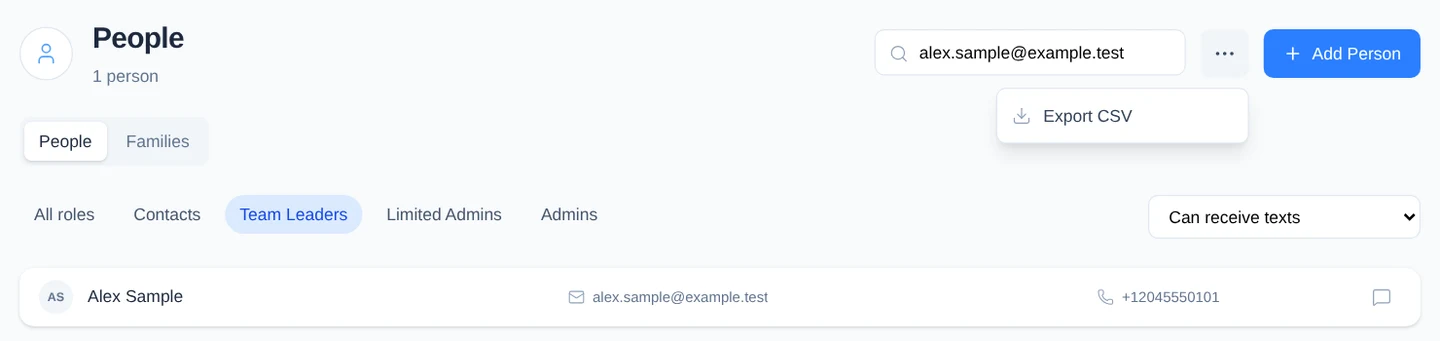
To search, enter a name, email address, or phone number in Search people…, then press Enter. You can enter a full or partial value.
-
To filter by role, select one of these options:
- All roles
- Contacts
- Team Leaders
- Limited Admins
- Admins
-
To filter by contact information or communication permission, open All people and choose:
- Can receive texts for people with a phone number and Given SMS permission.
- Can receive emails for people with an email address and Given email permission.
- Missing phone number.
- Missing email address.
-
Combine the search, role, and contact filters as needed. The count under People shows the total number of matching records.
-
To clear everything and return to the complete directory, select the People tab. You can also clear one filter at a time by choosing All roles, choosing All people, or emptying the search field and pressing Enter.
-
To export the current results, select More actions (the three-dot button), then select Export CSV.
What happens next
Engage Spot downloads a file named contacts-YYYY-MM-DD.csv. The export includes every person matching your current search and filters, not only the records currently visible on the page.
The file includes names, contact details, family information, role, status, communication permissions, and the date each person was created.
Troubleshooting
No people match your filters
Engage Spot shows No people found when no records match. Try a shorter search, choose a different filter, or select the People tab to reset the directory.
A person you expect is missing
Check each active search and filter. If you are a Team Leader, the person must belong to a team you lead before they appear in your People directory.
The export contains fewer people than expected
The CSV uses the same search, role, contact filter, and role-based access as the page. Clear filters you do not need, confirm the result count, and export again.